Todo List로 실행을 제어하기
장기 실행 Agent를 설계하다 보면 가장 먼저 부딪히게 되는 문제는,
컨텍스트가 길어질수록 목표를 잊고 엉뚱한 방향으로 흐르는 현상이다. 이를 Context Rot이라고 표현한다.
이를 해결하기 위한 가장 단순하면서도 강력한 방법이 Todo list 기반 Planning이다.
이번 글에서는 Deep Agent에 Todo list를 상태로 포함시키고, Tool Calling을 통해 이를 쓰고 읽는 구조를 코드와 함께 정리한다.
1. 왜 Todo List가 필요한가

많은 실제 Agent 시스템이 Todo list를 핵심 제어 장치로 사용한다.
- Anthropic의 Claude Code는 TodoWrite 기반 plan mode를 사용한다.
- Manus는 todo.md 파일을 지속적으로 갱신하며 작업 경로를 재확인한다.
- MCP는 Model Context Protocol라는 외부 연동 프로토콜로, 예시 실험에 사용된다.
핵심 아이디어는 다음과 같다.
작업을 끝낼 때마다 Todo list를 다시 읽고 재작성하면 Agent는 자신의 목표를 계속해서 "암송(Recitation)"한다.
2. State 설계 — Planning과 File system을 상태에 포함시키기
Todo Schema를 정의하기
from typing import Annotated, Literal, NotRequired
from typing_extensions import TypedDict
from langchain.agents import AgentState

class Todo(TypedDict):
    """A structured task item for tracking progress through complex workflows.

    Attributes:
        content: Short, specific description of the task
        status: Current state - pending, in_progress, or completed
    """

    content: str
    status: Literal["pending", "in_progress", "completed"]
우선 Planning (todo list)을 State schema에 포함시키기 위해서는 기본 AgentState를 가져와야 한다.
이 부분은 (from langchain.agents import AgentState) 에서 처리된다.
이 AgentState는 LangGraph에 의해 사전 구축되어 있으며, 이미 message key가 포함되어 있다.
다음으로 Todo라는 Schema를 정의한다.
이 부분은 각 Todo에 대한 status와 content를 포함하는 간단한 TypedDict가 된다.
파일 병합을 위한 file_reducer를 정의하기
def file_reducer(left, right):
    """Merge two file dictionaries, with right side taking precedence.

    Used as a reducer function for the files field in agent state,
    allowing incremental updates to the virtual file system.

    Args:
        left: Left side dictionary (existing files)
        right: Right side dictionary (new/updated files)

    Returns:
        Merged dictionary with right values overriding left values
    """
    if left is None:
        return right
    elif right is None:
        return left
    else:
        return {**left, **right}
이어서 file_reducer를 정의한다.
파일은 가상 파일 시스템으로 state 안에 저장된다.
Reducer를 사용해 dictionary를 병합한다.
마지막으로 AgentState를 상속받아 DeepAgentState를 정의하기
class DeepAgentState(AgentState):
    """Extended agent state that includes task tracking and virtual file system.

    Inherits from LangGraph's AgentState and adds:
    - todos: List of Todo items for task planning and progress tracking
    - files: Virtual file system stored as dict mapping filenames to content
    """

    todos: NotRequired[list[Todo]]
    files: Annotated[NotRequired[dict[str, str]], file_reducer]
기존 AgentState에 다음을 추가한다.
- todos
- files
정리하면 상태 구조는 다음 세 가지로 구성된다.
| Field | 역할 |
| messages | 대화 기록 |
| todos | 계획 관리 |
| files | 가상 파일 시스템 |
여기까지가 Planning을 가능하게 하는 기반 구조다.
3. Todo와 관련된 Tool 정의하기 (write_todos, read_todos)
Todo Description (LangGraph에서 정의)
from utils import show_prompt

from deep_agents_from_scratch.prompts import WRITE_TODOS_DESCRIPTION

show_prompt(WRITE_TODOS_DESCRIPTION)

>>>
╭───────────────────────────────────────────── Prompt ──────────────────────────────────────╮
│                                                                                           │
│                                                                                           │
│  ## When to Use                                                                           │
│  - Multi-step or non-trivial tasks requiring coordination                                 │
│  - When user provides multiple tasks or explicitly requests todo list                     │
│  - Avoid for single, trivial actions unless directed otherwise                            │
│                                                                                           │
│  ## Structure                                                                             │
│  - Maintain one list containing multiple todo objects (content, status, id)               │
│  - Use clear, actionable content descriptions                                             │
│  - Status must be: pending, in_progress, or completed                                     │
│                                                                                           │
│  ## Best Practices                                                                        │
│  - Only one in_progress task at a time                                                    │
│  - Mark completed immediately when task is fully done                                     │
│  - Always send the full updated list when making changes                                  │
│  - Prune irrelevant items to keep list focused                                            │
│                                                                                           │
│  ## Progress Updates                                                                      │
│  - Call TodoWrite again to change task status or edit content                             │
│  - Reflect real-time progress; don't batch completions                                    │
│  - If blocked, keep in_progress and add new task describing blocker                       │
│                                                                                           │
│  ## Parameters                                                                            │
│  - todos: List of TODO items with content and status fields                               │
│                                                                                           │
│  ## Returns                                                                               │
│  Updates agent state with new todo list.                                                  │
│                                                                                           │
╰───────────────────────────────────────────────────────────────────────────────────────────╯
이제 우리는 LLM에게 todo list를 생성하거나 Tool calling을 통해 이를 업데이트할 수 있는 도구를 제공해야 한다.
우선 Todos라는 Tool Description을 정의해야 한다.
이는 LangGraph에서 작성한 Tool Description 프롬프트를 사용한다.
이는 todo 도구를 언제 사용할지, todo 도구는 어떤 구조를 가지고 있는지, 모범 사례 등을 포함한다.
이는 LLM에게 todo 관련 도구를 어떻게 사용할지를 알려주는 좋은 예시이다.
도구 정의하기
"""TODO management tools for task planning and progress tracking.

This module provides tools for creating and managing structured task lists
that enable agents to plan complex workflows and track progress through
multi-step operations.
"""

from typing import Annotated

from langchain_core.messages import ToolMessage
from langchain_core.tools import InjectedToolCallId, tool
from langgraph.prebuilt import InjectedState
from langgraph.types import Command

from deep_agents_from_scratch.prompts import WRITE_TODOS_DESCRIPTION
from deep_agents_from_scratch.state import DeepAgentState, Todo


@tool(description=WRITE_TODOS_DESCRIPTION,parse_docstring=True)
def write_todos(
    todos: list[Todo], tool_call_id: Annotated[str, InjectedToolCallId]
) -> Command:
    """Create or update the agent's TODO list for task planning and tracking.

    Args:
        todos: List of Todo items with content and status
        tool_call_id: Tool call identifier for message response

    Returns:
        Command to update agent state with new TODO list
    """
    return Command(
        update={
            "todos": todos,
            "messages": [
                ToolMessage(f"Updated todo list to {todos}", tool_call_id=tool_call_id)
            ],
        }
    )
이제 도구를 정의한다.
도구를 만들 때, LLM에게 도구에 대한 설명을 tool decorator에 전달할 수 있으며, (description=WRITE_TODOS_DESCRIPTION) 을 통해 LangGraph에서 정의한 Todo description을 사용한다.
앞서 봤듯, 이는 이 도구를 LLM이 “언제 써야 하는지 / 입력 형태가 뭔지 / 모범 사례”를 프롬프트에 노출한다.
(LLM 행동이 여기서 크게 좌우된다.)
우리는 argument가 단순히 Todo의 list 형태임을 알 수 있다. (todos: list[Todo])
따라서 LLM은 기본적으로 우리의 지시에 따라 Todo list를 생성한다.
또한 InjectedToolCallId도 삽입한다.
write_todos Tool — 계획을 상태에 쓰기
@tool(description=WRITE_TODOS_DESCRIPTION,parse_docstring=True)
def write_todos(
    todos: list[Todo], tool_call_id: Annotated[str, InjectedToolCallId]
) -> Command:
    """Create or update the agent's TODO list for task planning and tracking.

    Args:
        todos: List of Todo items with content and status
        tool_call_id: Tool call identifier for message response

    Returns:
        Command to update agent state with new TODO list
    """
    return Command(
        update={
            "todos": todos,
            "messages": [
                ToolMessage(f"Updated todo list to {todos}", tool_call_id=tool_call_id)
            ],
        }
    )
write_todos 객체는 Todo list를 State에 쓰는 역할을 한다. (def write_todos)
앞서 우리의 State 객체에는 todos 필드와 message 필드가 있었다.
Todo는 content와 status를 가진 dict 구조다. (todos: list[Todo])
tool_call_id 부분은 실행 시 LangGraph가 해당 도구 호출의 ID를 자동 주입한다.
(tool_call_id: Annotated[str,InjectedToolCallId])
이 값을 ToolMessage에 넣어두면 “이 ToolMessage가 어떤 tool call에 대한 응답인지”가 정확히 연결된다.
주목할 점은 도구 자체에서 “문자열 관측치”가 아니라 Command 객체를 직접 반환한다는 점이다. (return Command)
이는 create_agent의 pre-built된 abstraction을 사용할 때 state update로 직접 이어진다.
read_todos Tool — 계획을 읽어오기
@tool(parse_docstring=True)
def read_todos(
    state: Annotated[DeepAgentState, InjectedState],
    tool_call_id: Annotated[str, InjectedToolCallId],
) -> str:
    """Read the current TODO list from the agent state.

    This tool allows the agent to retrieve and review the current TODO list
    to stay focused on remaining tasks and track progress through complex workflows.

    Args:
        state: Injected agent state containing the current TODO list
        tool_call_id: Injected tool call identifier for message tracking

    Returns:
        Formatted string representation of the current TODO list
    """
    todos = state.get("todos", [])
    if not todos:
        return "No todos currently in the list."

    result = "Current TODO List:\n"
    for i, todo in enumerate(todos, 1):
        status_emoji = {"pending": "⏳", "in_progress": "🔄", "completed": "✅"}
        emoji = status_emoji.get(todo["status"], "❓")
        result += f"{i}. {emoji} {todo['content']} ({todo['status']})\n"

    return result.strip()
read_todos 함수는 agent가 State에서 todo list를 읽어올 수 있도록 한다.
우선 입력으로 description은 따로 주지 않았고, 대신 docstring을 파싱해 최소한의 설명이 들어간다.
왜냐하면 read 도구는 보통 “컨텍스트 리프레시” 용도라서 규칙이 덜 복잡한 경우가 많기 때문이다.
반환은 str이다. Command가 아니라 관측치 문자열이다.
Return 값이 Command인 것과 str인 것의 차이는
- Command를 반환하면: tool node가 state를 직접 업데이트한다.
- str을 반환하면: prebuilt가 이를 ToolMessage로 감싸서 messages에 추가한다.
4. Agent 구성
이제 사용 가능한 Tool과 그 사용 방법을 Agent에게 간단히 전달할 수 있다.
create_agent 함수를 사용하고, 검색 도구를 만들어보자.
from IPython.display import Image, display
from langchain.chat_models import init_chat_model
from langchain_core.tools import tool
#from langgraph.prebuilt import create_react_agent
from langchain.agents import create_agent
from utils import format_messages

from deep_agents_from_scratch.prompts import TODO_USAGE_INSTRUCTIONS
from deep_agents_from_scratch.state import DeepAgentState
from deep_agents_from_scratch.todo_tools import read_todos, write_todos
이때, Agent에게 TODO_USAGE_INSTRUCTIONS라는 LangGraph에서 사전 정의된 prompt가 들어가는데,
그 내용은 아래와 같다.
from deep_agents_from_scratch.prompts import TODO_USAGE_INSTRUCTIONS

show_prompt(TODO_USAGE_INSTRUCTIONS)

>>>
╭──────────────────────────────────────────────────── Prompt ─────────────────────────────────────────────────────╮
│                                                                                                                 │
│  Based upon the user's request:                                                                                 │
│  1. Use the write_todos tool to create TODO at the start of a user request, per the tool description.           │
│  2. After you accomplish a TODO, use the read_todos to read the TODOs in order to remind yourself of the plan.  │
│  3. Reflect on what you've done and the TODO.                                                                   │
│  4. Mark you task as completed, and proceed to the next TODO.                                                   │
│  5. Continue this process until you have completed all TODOs.                                                   │
│                                                                                                                 │
│  IMPORTANT: Always create a research plan of TODOs and conduct research following the above guidelines for ANY  │
│  user request.                                                                                                  │
│  IMPORTANT: Aim to batch research tasks into a *single TODO* in order to minimize the number of TODOs you have  │
│  to keep track of.                                                                                              │
│                                                                                                                 │
│                                                                                                                 │
╰─────────────────────────────────────────────────────────────────────────────────────────────────────────────────╯
search_result를 반환하는 Mock search tool을 정의한다.
# Mock search result
search_result = """The Model Context Protocol (MCP) is an open standard protocol developed
by Anthropic to enable seamless integration between AI models and external systems like
tools, databases, and other services. It acts as a standardized communication layer,
allowing AI models to access and utilize data from various sources in a consistent and
efficient manner. Essentially, MCP simplifies the process of connecting AI assistants
to external services by providing a unified language for data exchange. """


# Mock search tool
@tool(parse_docstring=True)
def web_search(
    query: str,
):
    """Search the web for information on a specific topic.

    This tool performs web searches and returns relevant results
    for the given query. Use this when you need to gather information from
    the internet about any topic.

    Args:
        query: The search query string. Be specific and clear about what
               information you're looking for.

    Returns:
        Search results from search engine.

    Example:
        web_search("machine learning applications in healthcare")
    """
    return search_result
그 다음으로 모델을 초기화한다. (간단한 Research Instructions를 정의한다)
# Create agent using create_react_agent directly
model = init_chat_model(model="anthropic:claude-sonnet-4-20250514", temperature=0.0)
tools = [write_todos, web_search, read_todos]

# Add mock research instructions
SIMPLE_RESEARCH_INSTRUCTIONS = """IMPORTANT: Just make a single call to the web_search tool and use the result provided by the tool to answer the user's question."""
다음으로 create_agent 함수를 이용하여 Agent를 생성한다.
# Create agent
agent = create_agent(
    model,
    tools,
    system_prompt=TODO_USAGE_INSTRUCTIONS
    + "\n\n"
    + "=" * 80
    + "\n\n"
    + SIMPLE_RESEARCH_INSTRUCTIONS,
    state_schema=DeepAgentState,
)
# Show the agent
display(Image(agent.get_graph(xray=True).draw_mermaid_png()))

5. 모델의 실행 흐름 확인하기 (invoke)
result = agent.invoke(
    {
        "messages": [
            {
                "role": "user",
                "content": "Give me a short summary of the Model Context Protocol (MCP).",
            }
        ],
        "todos": [],
    }
)
이제 Message를 전달하여 Agent를 호출해본다.
여기서는 "MCP에 대한 짧은 요약을 주세요"라는 Message를 전달했다.
우선, Human Message가 들어오고, LLM은 우리가 지시한대로 write_tools 도구를 호출한다.
여기서 todos list는 상태(status)와 content를 가진 매우 간단한 목록이다.
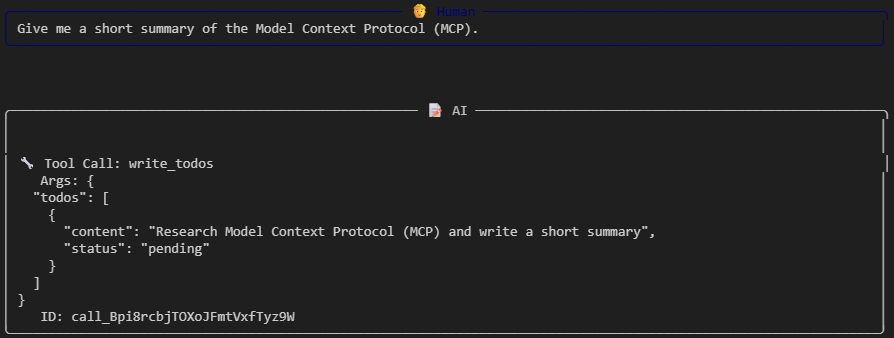
여기서 todos list는 상태(status)와 content를 가진 매우 간단한 목록이다.
이제 일어나는 일은, Graph의 state가 todo list와 함께 update되고, todo list를 update했다는 Tool Message가 출력된다.
이 작업은 write_todos 도구 내에서 수행된다.

이렇게 todo list가 작성되면, LLM은 web search를 실행한다.
그 결과로 mock web search 결과를 반환받는다.
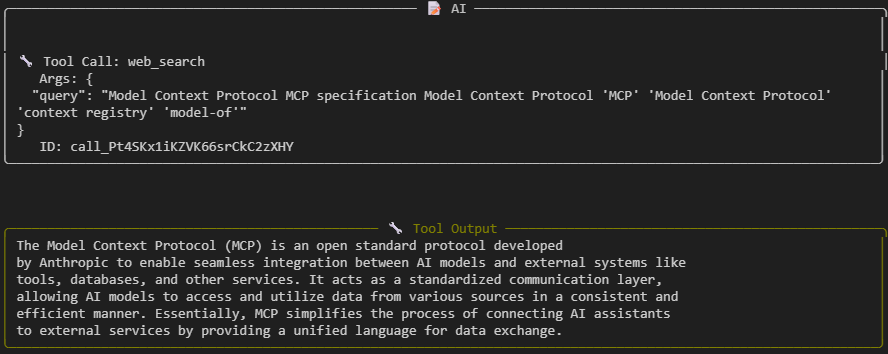
다음으로 LLM은 read_todos 함수를 통해 todo list를 읽어들인다.
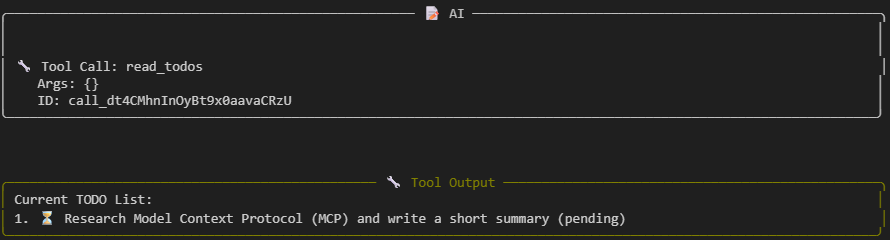
그 다음, 이 작업이 완료되었음을 나타내도록 todo list를 업데이트한다. ("status": "completed")

이제 다시 read_todos 함수를 호출해 todo list를 관찰하고, 모든 todo list를 수행했음을 확인한 후 최종 결과를 반환한다.

'Agentic AI 구축 > LangChain & LangGraph' 카테고리의 다른 글
| [Deep Agent 구현 3] Sub Agent 구축하기 (0) | 2026.03.09 |
|---|---|
| [Deep Agent 구현 2] File 시스템 구축하기 (0) | 2026.02.23 |
| [LangChain 함수 8] Human-in-the-Loop 구현하기 (Middleware) (0) | 2026.02.04 |
| [LangChain 함수 7] Agent Customizing하기 (Middleware를 활용한 Dynamic Prompt) (0) | 2026.02.04 |
| [LangChain 함수 6] Agent로 구조화된 출력 생성하기 (0) | 2026.01.10 |