Context Offloading을 위한 File System 설계
장기 실행 Deep Agent를 설계할 때 가장 먼저 부딪히는 한계는 Context가 오염되는 것이다.
수십 번의 tool call이 발생하면 초기 목표, 중간 산출물, 사용자 요청의 세부사항이 희미해진다.
이 문제를 해결하는 대표적인 패턴이 Context Offloading이다.
이번 글에서는 LangGraph State 위에 간단한 가상 파일 시스템을 구축하고,
이를 활용해 Agent가 파일을 나열하고, 읽고, 쓰는 구조를 설명한다.
1. 왜 파일 시스템이 필요한가
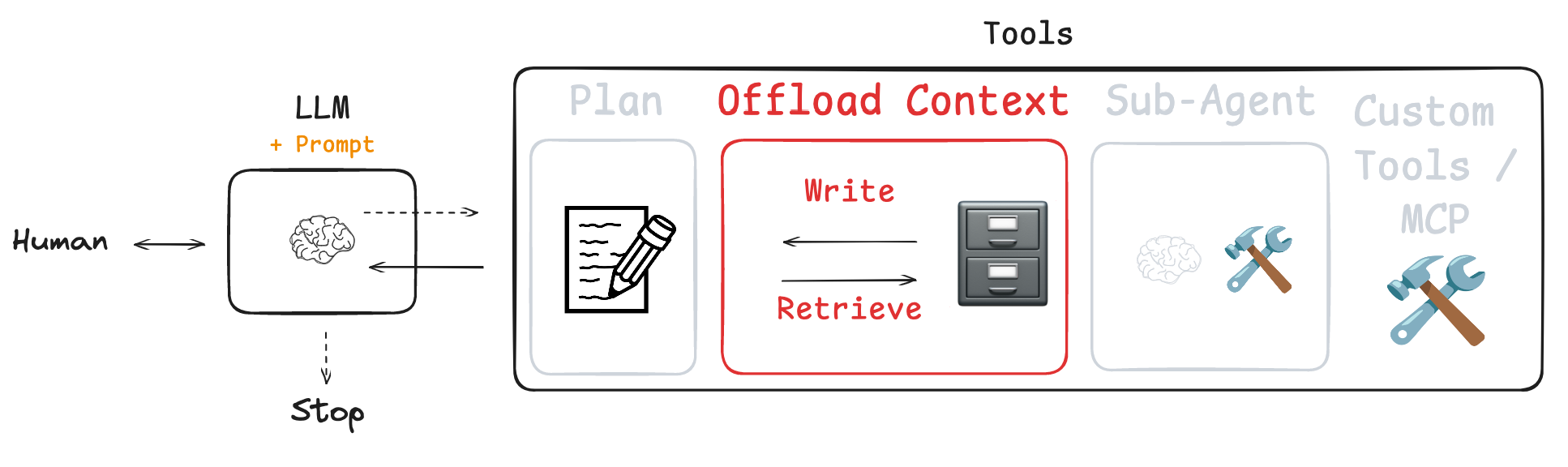
앞서 Todo list에서 살펴보았던 Planning 단계는 “무엇을 할 것인가”를 관리한다.
파일 시스템은 “무엇을 저장할 것인가”를 관리한다.
장기 실행 Agent에서 자주 등장하는 패턴은 다음과 같다.
- User request 저장
- 중간 Analysis Result 저장
- Summarization 저장
- 긴 Document 분할 저장
- 이후 step에서 Reloading
컨텍스트를 Message history에만 쌓으면 결국 길이 제한에 걸리거나, Context가 오염될 수 있다.
이때 파일 시스이 유용한데, 파일은 상태(State)에 영구적으로 저장되므로, 언제든 다시 불러올 수 있다.
2. 가상 파일 시스템 구조
여기에서는 실제 OS 파일 시스템을 쓰지 않고, LangGraph의 state 안에 dictionary를 하나 둔다.
files: dict[str, str]
- key → 파일 경로 (mock path)
- value → 파일 내용
이 구조는 thread 단위로 유지되는 short-term persistence의 특성을 지닌다.
3. 파일 도구 설계
from typing import Annotated

from langchain_core.messages import ToolMessage
from langchain_core.tools import InjectedToolCallId, tool
from langgraph.prebuilt import InjectedState
from langgraph.types import Command

from deep_agents_from_scratch.prompts import (
    LS_DESCRIPTION,
    READ_FILE_DESCRIPTION,
    WRITE_FILE_DESCRIPTION,
)
from deep_agents_from_scratch.state import DeepAgentState
여기에서는 3가지 도구를 만든다.
- ls (가상 파일 시스템의 모든 파일을 나열한 것)
- read_file (file_path를 사용해 지정된 파일 읽기)
- write_file (file_path에 content 내용 쓰기)
각 도구는 @tool(description=...)로 정의되는데 여기서 중요한 점은,
@tool(description=LS_DESCRIPTION)
이 부분에서 description을 직접 넣으면 docstring은 LLM에게 노출되지 않는다.
보통 LLM에게 제공해야 하는 긴 설명은 prompts 파일에 두고 관리하는 것이 유리하다.
각각의 Tool Description은 다음과 같다.
from utils import show_prompt

from deep_agents_from_scratch.prompts import (
    LS_DESCRIPTION,
    READ_FILE_DESCRIPTION,
    WRITE_FILE_DESCRIPTION,
)

show_prompt(LS_DESCRIPTION)
>>>
╭──────────────────────────────────────────────────── Prompt ─────────────────────────────────────────────╮
│                                                                                                         │
│  List all files in the virtual filesystem stored in agent state.                                        │
│                                                                                                         │
│  Shows what files currently exist in agent memory. Use this to orient yourself before other             │
│  file operations and maintain awareness of your file organization.                                      │
│                                                                                                         │
│  No parameters required - simply call ls() to see all available files.                                  │
│                                                                                                         │
╰─────────────────────────────────────────────────────────────────────────────────────────────────────────╯

show_prompt(READ_FILE_DESCRIPTION)
>>>
╭──────────────────────────────────────────────────── Prompt ─────────────────────────────────────────────╮
│                                                                                                         │
│  Read content from a file in the virtual filesystem with optional pagination.                           │
│                                                                                                         │
│  This tool returns file content with line numbers (like `cat -n`) and supports reading large files      │
│  in chunks to avoid context overflow.                                                                   │
│                                                                                                         │
│  Parameters:                                                                                            │
│  - file_path (required): Path to the file you want to read                                              │
│  - offset (optional, default=0): Line number to start reading from                                      │
│  - limit (optional, default=2000): Maximum number of lines to read                                      │
│                                                                                                         │
│  Essential before making any edits to understand existing content. Always read a file before editing it.│
│                                                                                                         │
╰─────────────────────────────────────────────────────────────────────────────────────────────────────────╯

show_prompt(WRITE_FILE_DESCRIPTION)
>>>
╭──────────────────────────────────────────────────── Prompt ─────────────────────────────────────────────╮
│                                                                                                         │
│  Create a new file or completely overwrite an existing file in the virtual filesystem.                  │
│                                                                                                         │
│  This tool creates new files or replaces entire file contents. Use for initial file creation or         │
│  complete rewrites. Files are stored persistently in agent state.                                       │
│                                                                                                         │
│  Parameters:                                                                                            │
│  - file_path (required): Path where the file should be created/overwritten                              │
│  - content (required): The complete content to write to the file                                        │
│                                                                                                         │
│  Important: This replaces the entire file content.                                                      │
│                                                                                                         │
╰─────────────────────────────────────────────────────────────────────────────────────────────────────────╯
ls 도구 - 파일 목록 확인
@tool(description=LS_DESCRIPTION)
def ls(state: Annotated[DeepAgentState, InjectedState]) -> list[str]:
    return list(state.get("files", {}).keys())
ls 도구는 상태에 있는 파일들을 나열한다.
앞선 Planning에서 도입한 우리는 DeepAgentState를 State로 주입한다.
DeepAgentState는 다음과 같이 정의된다.
class DeepAgentState(AgentState):
    """Extended agent state that includes task tracking and virtual file system.

    Inherits from LangGraph's AgentState and adds:
    - todos: List of Todo items for task planning and progress tracking
    - files: Virtual file system stored as dict mapping filenames to content
    """

    todos: NotRequired[list[Todo]]
    files: Annotated[NotRequired[dict[str, str]], file_reducer]
(이 State는 Tool이 Graph State에 접근할 수 있게 함)
이후 Graph State에서 파일을 가져와 list로 반환한다.
이 도구는 Agent가 "현재 어떤 파일이 있는지" 방향을 잡는 단계다.
read_file 도구 — 파일 내용 읽기
@tool(description=READ_FILE_DESCRIPTION, parse_docstring=True)
def read_file(
    file_path: str,
    state: Annotated[DeepAgentState, InjectedState],
    offset: int = 0,
    limit: int = 2000,
) -> str:
    """Read file content from virtual filesystem with optional offset and limit.

    Args:
        file_path: Path to the file to read
        state: Agent state containing virtual filesystem (injected in tool node)
        offset: Line number to start reading from (default: 0)
        limit: Maximum number of lines to read (default: 2000)

    Returns:
        Formatted file content with line numbers, or error message if file not found
    """
    files = state.get("files", {})
    if file_path not in files:
        return f"Error: File '{file_path}' not found"

    content = files[file_path]
    if not content:
        return "System reminder: File exists but has empty contents"

    lines = content.splitlines()
    start_idx = offset
    end_idx = min(start_idx + limit, len(lines))

    if start_idx >= len(lines):
        return f"Error: Line offset {offset} exceeds file length ({len(lines)} lines)"

    result_lines = []
    for i in range(start_idx, end_idx):
        line_content = lines[i][:2000]  # Truncate long lines
        result_lines.append(f"{i + 1:6d}\t{line_content}")

    return "\n".join(result_lines)
이제 read_file tool을 보자.
이전과 마찬가지로 InjectedState를 사용할 것이며, LLM이 파일 경로, offset, 그리고 제한을 지정하도록 한다.
show_prompt(READ_FILE_DESCRIPTION)
>>>
╭──────────────────────────────────────────────────── Prompt ─────────────────────────────────────────────╮
│                                                                                                         │
│  Read content from a file in the virtual filesystem with optional pagination.                           │
│                                                                                                         │
│  This tool returns file content with line numbers (like `cat -n`) and supports reading large files      │
│  in chunks to avoid context overflow.                                                                   │
│                                                                                                         │
│  Parameters:                                                                                            │
│  - file_path (required): Path to the file you want to read                                              │
│  - offset (optional, default=0): Line number to start reading from                                      │
│  - limit (optional, default=2000): Maximum number of lines to read                                      │
│                                                                                                         │
│  Essential before making any edits to understand existing content. Always read a file before editing it.│
│                                                                                                         │
╰─────────────────────────────────────────────────────────────────────────────────────────────────────────╯- file_path → LLM이 제공
- state → InjectedState에 의해 자동 주입
- offset → 시작 라인
- limit → 최대 읽을 라인 수
이 함수는 State에서 file을 가져오고, 실제로 읽고자 하는 파일을 분리하여 읽고, 선택적으로 지정된 범위만 읽어 파일 내용을 문자열로 간단히 반환하는 간단한 구현이다.
이때 다음 부분이 중요하다.
files = state.get("files", {})
if file_path not in files:
    return f"Error: File '{file_path}' not found"
여기서 Error 메시지는 사람용이 아니라 LLM용이다.
여기서는 LLM이 이를 읽고 재시도할 수 있도록 설계되어 있다.
또한 부분 읽기도 구현되어 있다.
lines = content.splitlines()
start_idx = offset
end_idx = min(start_idx + limit, len(lines))
이 방식은 다음을 가능하게 한다.
- 대용량 파일 분할 읽기
- 특정 구간만 재확인
- 토큰 사용 최소화
라인 번호도 함께 반환한다.
result_lines.append(f"{i + 1:6d}\t{line_content}")
write_file 도구 — 파일 내용 읽기
@tool(description=WRITE_FILE_DESCRIPTION, parse_docstring=True)
def write_file(
    file_path: str,
    content: str,
    state: Annotated[DeepAgentState, InjectedState],
    tool_call_id: Annotated[str, InjectedToolCallId],
) -> Command:
    """Write content to a file in the virtual filesystem.

    Args:
        file_path: Path where the file should be created/updated
        content: Content to write to the file
        state: Agent state containing virtual filesystem (injected in tool node)
        tool_call_id: Tool call identifier for message response (injected in tool node)

    Returns:
        Command to update agent state with new file content
    """
    files = state.get("files", {})
    files[file_path] = content
    return Command(
        update={
            "files": files,
            "messages": [
                ToolMessage(f"Updated file {file_path}", tool_call_id=tool_call_id)
            ],
        }
    )
마지막으로 파일을 작성한다. 다른 함수 마찬가지로 state, file_path, content를 사용한다.
State가 Injected된다. 따라서 LLM에서 tool calling은 이 2가지만 제공하면 된다. (file_path, content)
여기서는 Graph의 State를 직접 update하기 때문에 Command 객체를 사용한다.
show_prompt(WRITE_FILE_DESCRIPTION)
>>>
╭──────────────────────────────────────────────────── Prompt ─────────────────────────────────────────────╮
│                                                                                                         │
│  Create a new file or completely overwrite an existing file in the virtual filesystem.                  │
│                                                                                                         │
│  This tool creates new files or replaces entire file contents. Use for initial file creation or         │
│  complete rewrites. Files are stored persistently in agent state.                                       │
│                                                                                                         │
│  Parameters:                                                                                            │
│  - file_path (required): Path where the file should be created/overwritten                              │
│  - content (required): The complete content to write to the file                                        │
│                                                                                                         │
│  Important: This replaces the entire file content.                                                      │
│                                                                                                         │
╰─────────────────────────────────────────────────────────────────────────────────────────────────────────╯
여기서 가장 중요한 점은 반환 타입이다.
→ Command
files = state.get("files", {})
files[file_path] = content
dictionary에 파일을 추가하거나 덮어쓴다.
return Command(
    update={
        "files": files,
        "messages": [
            ToolMessage(f"Updated file {file_path}", tool_call_id=tool_call_id)
        ],
    }
)
결국 write_file은
- files 상태 업데이트
- ToolMessage를 messages에 추가
두 작업을 동시에 수행한다.
4. File Reducer의 역할
file_reducer 함수는 다음과 같이 정의되어 있다.
def file_reducer(left, right):
    """Merge two file dictionaries, with right side taking precedence.

    Used as a reducer function for the files field in agent state,
    allowing incremental updates to the virtual file system.

    Args:
        left: Left side dictionary (existing files)
        right: Right side dictionary (new/updated files)

    Returns:
        Merged dictionary with right values overriding left values
    """
    if left is None:
        return right
    elif right is None:
        return left
    else:
        return {**left, **right}
위에서 볼 수 있듯 DeepAgentState에서 files는 다음처럼 정의되어 있다.
files: Annotated[NotRequired[dict[str, str]], file_reducer]
여기서 Reducer는 다음과 같이 구현되어 있다
return {**left, **right}
이것의 의미는 다음과 같다.
- left → 기존 state의 파일들
- right → 새 업데이트 값
- right가 같은 key를 가지면 덮어쓴다
즉, 중복 key는 항상 최신 값이 우선하는데, 이것이 incremental update를 가능하게 한다.
5. Agent Workflow 구성
다음으로 Agent에게 넣어줄 File Usage Instruction을 정의한다.
# File usage instructions
FILE_USAGE_INSTRUCTIONS = """You have access to a virtual file system to help you retain and save context.

## Workflow Process
1. **Orient**: Use ls() to see existing files before starting work
2. **Save**: Use write_file() to store the user's request so that we can keep it for later
3. **Read**: Once you are satisfied with the collected sources, read the saved file and use it to ensure that you directly answer the user's question."""

# Add mock research instructions
SIMPLE_RESEARCH_INSTRUCTIONS = """IMPORTANT: Just make a single call to the web_search tool and use the result provided by the tool to answer the user's question."""

# Full prompt
INSTRUCTIONS = (
    FILE_USAGE_INSTRUCTIONS + "\n\n" + "=" * 80 + "\n\n" + SIMPLE_RESEARCH_INSTRUCTIONS
)
show_prompt(INSTRUCTIONS)

>>>
╭──────────────────────────────────────────────────── Prompt ─────────────────────────────────────────────────────╮
│                                                                                                                 │
│  You have access to a virtual file system to help you retain and save context.                                  │
│                                                                                                                 │
│  ## Workflow Process                                                                                            │
│  1. **Orient**: Use ls() to see existing files before starting work                                             │
│  2. **Save**: Use write_file() to store the user's request so that we can keep it for later                     │
│  3. **Read**: Once you are satisfied with the collected sources, read the saved file and use it to ensure that  │
│  you directly answer the user's question.                                                                       │
│                                                                                                                 │
│  ================================================================================                               │
│                                                                                                                 │
│  IMPORTANT: Just make a single call to the web_search tool and use the result provided by the tool to answer    │
│  the user's question.                                                                                           │
│                                                                                                                 │
╰─────────────────────────────────────────────────────────────────────────────────────────────────────────────────╯
이 부분을 요약하면 다음과 같다.
FILE_USAGE_INSTRUCTIONS = """
1. Orient → ls()
2. Save → write_file()
3. Read → read_file()
"""
이 부분은 사용자에 의해 얼마든지 Customizing될 수 있다.
5. Agent 구성
이제 create_agent 함수를 이용해 Agent를 정의하고 Planning에서 사용했던 간단한 출력이 정의된 검색 도구를 정의한다.
그리고 모든 도구와 Instruction(System Prompt)를 Agent에게 전달한다.
from IPython.display import Image, display
from langchain.chat_models import init_chat_model
from langchain_core.tools import tool
#from langgraph.prebuilt import create_react_agent
from langchain.agents import create_agent
from utils import format_messages

from deep_agents_from_scratch.file_tools import ls, read_file, write_file
from deep_agents_from_scratch.state import DeepAgentState

# Mock search result
search_result = """The Model Context Protocol (MCP) is an open standard protocol developed
by Anthropic to enable seamless integration between AI models and external systems like
tools, databases, and other services. It acts as a standardized communication layer,
allowing AI models to access and utilize data from various sources in a consistent and
efficient manner. Essentially, MCP simplifies the process of connecting AI assistants
to external services by providing a unified language for data exchange. """


# Mock search tool
@tool(parse_docstring=True)
def web_search(
    query: str,
):
    """Search the web for information on a specific topic.

    This tool performs web searches and returns relevant results
    for the given query. Use this when you need to gather information from
    the internet about any topic.

    Args:
        query: The search query string. Be specific and clear about what
               information you're looking for.

    Returns:
        Search results from search engine.

    Example:
        web_search("machine learning applications in healthcare")
    """
    return search_result


# Create agent using create_react_agent directly
model = init_chat_model(model="gpt-5-mini", temperature=0.0)
tools = [ls, read_file, write_file, web_search]

# Create agent with system prompt
agent = create_agent(
    model, tools, system_prompt=INSTRUCTIONS, state_schema=DeepAgentState
)

# Show the agent
display(Image(agent.get_graph(xray=True).draw_mermaid_png()))
6. 모델의 실행 흐름 확인하기 (invoke)
result = agent.invoke(
    {
        "messages": [
            {
                "role": "user",
                "content": "Give me an overview of Model Context Protocol (MCP).",
            }
        ],
        "files": {},
    }
)
format_messages(result["messages"])
이제 Message를 전달하여 Agent를 호출해본다.
마찬가지로 "MCP에 대한 짧은 요약을 주세요"라는 Message를 전달했다.
앞서 Todo list와 관련된 함수에서는 write_todo라는 함수가 가장 먼저 호출되었다.
이제 흥미로운 점은, 우리의 Instruction대로 Agent에게 먼저 ls를 실행하여 기존 파일이 있는지 확인한다.
그렇게 했더니 작성된 파일이 없었다.

이제 Agent는 "좋아, 사용자의 질문을 담은 파일을 작성할게"라고 한다.
우리가 Instruction에 명시한 대로 새로운 user request를 포함하는 파일을 만들었다.
Tool output에 따르면, user_request.txt라는 새 파일이 생성되었다.
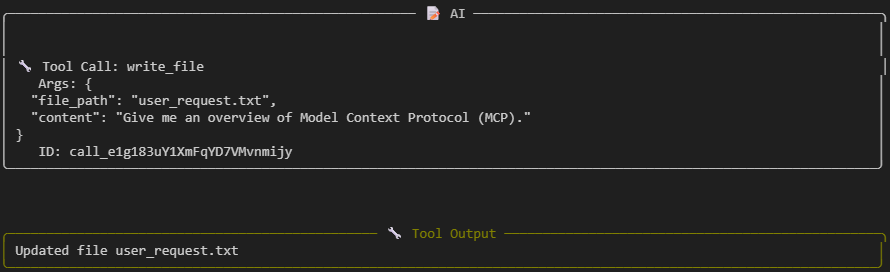
이제 웹 검색을 실행해 검색 결과를 얻었다.

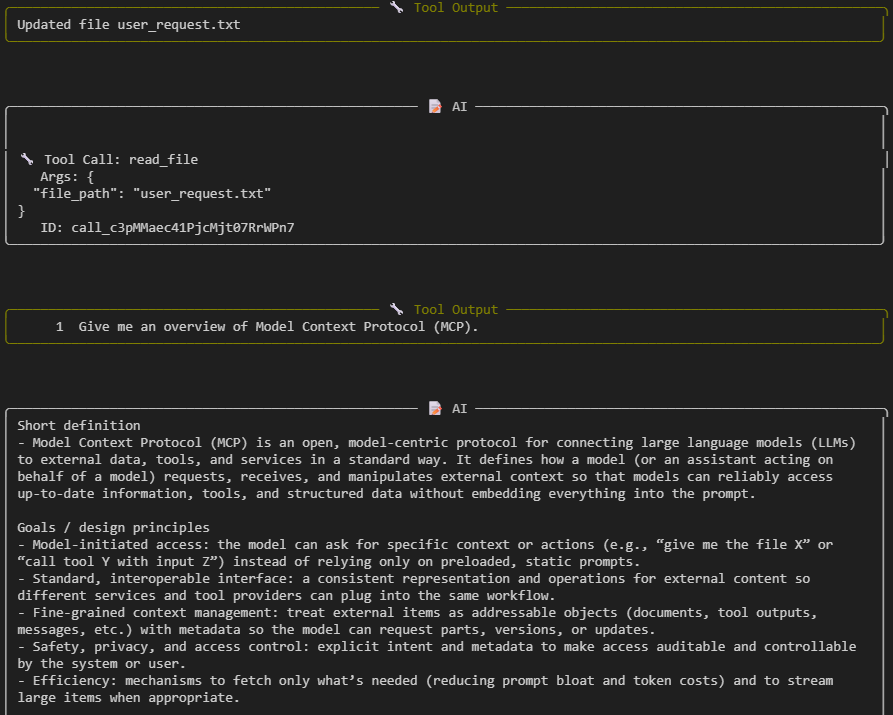
그런 다음 지시한대로 우리가 만든 파일, user_request를 read_file로 읽어 context를 다시 확인한다.
여기서 도구 출력으로 보여주고, 그런 다음 질문에 답을 한다.
7. 파일 시스템이 의미하는 점
결국 파일 시스템을 통한 Context Offloading은 다음과 같은 흐름으로 진행된다.
User 질문 : "Give me an overview of Model Context Protocol (MCP)."
실행 단계:
- ls() 실행 → 파일 없음 확인
- write_file("user_request.txt", 질문 내용)
- web_search 호출
- read_file("user_request.txt")
- 최종 답변 생성

이처럼 state 안에 실제로 저장된 파일을 확인할 수 있다.
그러나 장기 실행 Agent에서는 상황이 다르다.
- 40~50회 tool call 이후
- 컨텍스트 일부가 압축되거나 제거된 상태에서
- 초기 사용자 요청을 다시 확인해야 하는 경우
이때 파일 기반 context retrieval이 매우 중요해진다.
'Agentic AI 구축 > LangChain & LangGraph' 카테고리의 다른 글
| Ambient Agent의 개념 (이벤트 기반 Persistent AI Agent 아키텍처) (0) | 2026.03.14 |
|---|---|
| [Deep Agent 구현 3] Sub Agent 구축하기 (0) | 2026.03.09 |
| [Deep Agent 구현 1] Todo list 구현하기 (0) | 2026.02.23 |
| [LangChain 함수 8] Human-in-the-Loop 구현하기 (Middleware) (0) | 2026.02.04 |
| [LangChain 함수 7] Agent Customizing하기 (Middleware를 활용한 Dynamic Prompt) (0) | 2026.02.04 |