Middleware를 활용한 Human in the Loop 구현
Agent가 상황을 해결하기 위해 인간의 개입이 필요한 경우가 종종 있다.
이를 Human-in-the-Loop 구조로 처리할 수 있다.
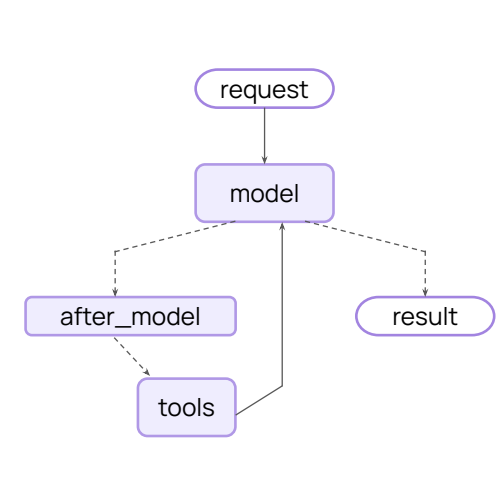
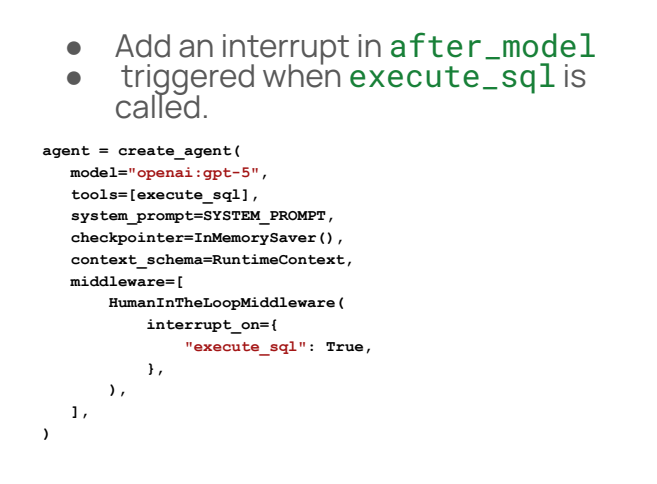
우는 Agent를 정의할 때, 어떤 Tool Calling에 대해 인간의 Feedback을 받고 싶은지 지정할 수 있다.
이러한 도구 중 하나가 호출되면, Interrupt가 발생하여 인간의 응답을 요청하게 된다.
우리는 승인, 거절, Edit의 허용 등 여러가지 응답을 생성할 수 있다.
Example Code
우선 Chinook DB에 연결하고 Runtime Context를 정의한다.
RuntimeContext와 execute_SQL Tool과 System Prompt도 마찬가지로 정의한다.
from langchain_community.utilities import SQLDatabase

db = SQLDatabase.from_uri("sqlite:///Chinook.db")
from dataclasses import dataclass
@dataclass
class RuntimeContext:
db: SQLDatabasefrom langchain_core.tools import tool
from langgraph.runtime import get_runtime
@tool
def execute_sql(query: str) -> str:
"""Execute a SQLite command and return results."""
runtime = get_runtime(RuntimeContext)
db = runtime.context.db
try:
return db.run(query)
except Exception as e:
return f"Error: {e}"SYSTEM_PROMPT = """You are a careful SQLite analyst.
Rules:
- Think step-by-step.
- When you need data, call the tool `execute_sql` with ONE SELECT query.
- Read-only only; no INSERT/UPDATE/DELETE/ALTER/DROP/CREATE/REPLACE/TRUNCATE.
- Limit to 5 rows unless the user explicitly asks otherwise.
- If the tool returns 'Error:', revise the SQL and try again.
- Prefer explicit column lists; avoid SELECT *.
- If the database is offline, ask user to try again later without further comment.
"""
Agent 생성 및 실행
그런 다음 Create Agent 기능을 사용하여 HumanInTheLoopMiddleware가 포함된 Agent를 생성한다.
이 Middleware를 통해 중단하고 싶은 특정 도구를 지정할 수 있다.
이 경우, 우리의 execute_SQL 도구를 지정하고 우리가 선택하는 Decision을 지정할 수 있다.
from langchain.agents import create_agent
from langchain.agents.middleware import HumanInTheLoopMiddleware
from langgraph.checkpoint.memory import InMemorySaver

agent = create_agent(
    model="openai:gpt-5",
    tools=[execute_sql],
    system_prompt=SYSTEM_PROMPT,
    checkpointer=InMemorySaver(),
    context_schema=RuntimeContext,
    middleware=[
        HumanInTheLoopMiddleware(
            interrupt_on={"execute_sql": {"allowed_decisions": ["approve", "reject"]}},
        ),
    ],
)
그 다음 "모든 직원의 이름이 무엇인가요?"라는 질문을 수행한다.
config에서 checkpoint를 추적할 수 있도록 이 작업을 thread_id = 1에서 수행한다.
Loop가 중단될 때 checkpoint를 확인할 수 있다.
from langgraph.types import Command

question = "What are the names of all the employees?"

config = {"configurable": {"thread_id": "1"}}

result = agent.invoke(
    {"messages": [{"role": "user", "content": question}]},
    config=config,
    context=RuntimeContext(db=db)
)

if "__interrupt__" in result:
    description = result['__interrupt__'][-1].value['action_requests'][-1]['description']
    print(f"\033[1;3;31m{80 * '-'}\033[0m")
    print(
        f"\033[1;3;31m Interrupt:{description}\033[0m"
    )

    result = agent.invoke(
        Command(
            resume={
                "decisions": [{"type": "reject", "message": "the database is offline."}]
            }
        ),
        config=config,  # Same thread ID to resume the paused conversation
        context=RuntimeContext(db=db),
    )
    print(f"\033[1;3;31m{80 * '-'}\033[0m")

print(result["messages"][-1].content)
Agent에게 질문을 던지면 __interrupt__ 키가 result에 있다.
이 __interrupt__ 키가 있을 때마다 앞서 설정한 Decision을 통해 다시 실행할 수 있다.
첫 번째 경우에는 __interrupt__ 키가 발생한다면 DB가 offline 상태라는 이유로 Tool calling을 거부할 것이다.
이 출력이 어떻게 보이는지를 확인한다.
Database가 offline 상태이기 때문에 다음에 다시 시도하라는 AIMessage가 나온다.
>>>
--------------------------------------------------------------------------------
 Interrupt:Tool execution requires approval

Tool: execute_sql
Args: {'query': "SELECT name FROM sqlite_master WHERE type = 'table' AND lower(name) LIKE '%employee%' LIMIT 5;"}
--------------------------------------------------------------------------------
The database is currently offline. Please try again later.
이번에는 __interrupt__ 메시지에 대해 모든 Tool Calling을 허용한다.
config = {"configurable": {"thread_id": "2"}}

result = agent.invoke(
    {"messages": [{"role": "user", "content": question}]},
    config=config,
    context=RuntimeContext(db=db)
)

while "__interrupt__" in result:
    description = result['__interrupt__'][-1].value['action_requests'][-1]['description']
    print(f"\033[1;3;31m{80 * '-'}\033[0m")
    print(
        f"\033[1;3;31m Interrupt:{description}\033[0m"
    )

    result = agent.invoke(
        Command(
            resume={"decisions": [{"type": "approve"}]}
        ),
        config=config,  # Same thread ID to resume the paused conversation
        context=RuntimeContext(db=db),
    )

for msg in result["messages"]:
    msg.pretty_print()
같은 설정으로 interrupt 키드를 확인하면 결과가 나온다.
도구 실행에는 approval이 필요하다고 한다. 이것이 Message 기록에서 어떻게 보이는지를 확인하자.
HumanMessage가 질문을 한다.
그 다음 2개의 SQL 도구 호출이 보이는데, 이는 위의 interrupt와 일치한다.
그리고 질문에 대한 최종 결과가 나온다.
>>>
--------------------------------------------------------------------------------
 Interrupt:Tool execution requires approval

Tool: execute_sql
Args: {'query': "SELECT name FROM sqlite_master WHERE type='table' ORDER BY name LIMIT 50;"}
--------------------------------------------------------------------------------
 Interrupt:Tool execution requires approval

Tool: execute_sql
Args: {'query': "SELECT FirstName || ' ' || LastName AS FullName FROM Employee ORDER BY LastName, FirstName;"}
================================ Human Message =================================

What are the names of all the employees?
================================== Ai Message ==================================
Tool Calls:
  execute_sql (call_jqiRG1UfS4btHYeOEL2SwHvJ)
 Call ID: call_jqiRG1UfS4btHYeOEL2SwHvJ
  Args:
    query: SELECT name FROM sqlite_master WHERE type='table' ORDER BY name LIMIT 50;
================================= Tool Message =================================
Name: execute_sql

[('Album',), ('Artist',), ('Customer',), ('Employee',), ('Genre',), ('Invoice',), ('InvoiceLine',), ('MediaType',), ('Playlist',), ('PlaylistTrack',), ('Track',)]
================================== Ai Message ==================================
Tool Calls:
  execute_sql (call_yZFckESdLKxfOeKjIJRT74we)
 Call ID: call_yZFckESdLKxfOeKjIJRT74we
  Args:
    query: SELECT FirstName || ' ' || LastName AS FullName FROM Employee ORDER BY LastName, FirstName;
================================= Tool Message =================================
Name: execute_sql

[('Andrew Adams',), ('Laura Callahan',), ('Nancy Edwards',), ('Steve Johnson',), ('Robert King',), ('Michael Mitchell',), ('Margaret Park',), ('Jane Peacock',)]
================================== Ai Message ==================================

Here are the employee names (LastName, FirstName order):

- Andrew Adams
- Laura Callahan
- Nancy Edwards
- Steve Johnson
- Robert King
- Michael Mitchell
- Margaret Park
- Jane Peacock'Agentic AI 구축 > LangChain & LangGraph' 카테고리의 다른 글
| [LangChain 함수 7] Agent Customizing하기 (Middleware를 활용한 Dynamic Prompt) (0) | 2026.02.04 |
|---|---|
| [LangChain 함수 6] Agent로 구조화된 출력 생성하기 (0) | 2026.01.10 |
| [LangChain 함수 5] Agent에 Memory 추가하기 (0) | 2026.01.10 |
| [LangChain 함수 4] Tool 활용 방법과 Model Context Protocol (0) | 2026.01.10 |
| [LangChain 함수 3] Streaming을 통해 결과 반환반기 (stream) (0) | 2026.01.10 |