왜 Structured Output이 필요한가?
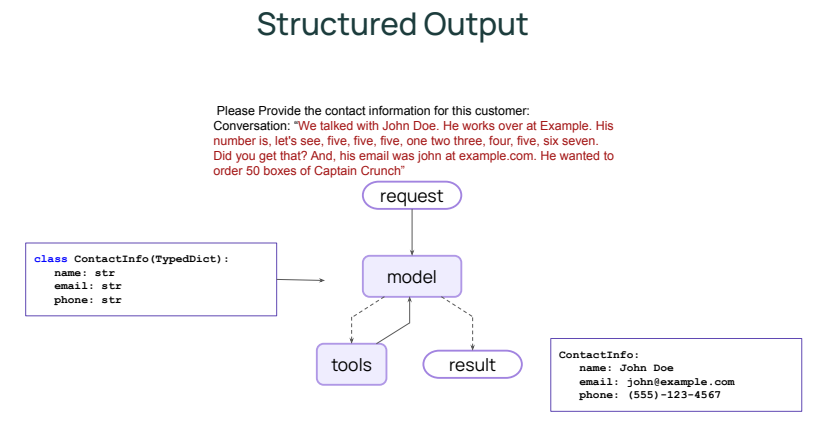
LLM은 본질적으로 자연어를 생성하는 모델이다.
하지만 Agent가 기존 컴퓨터 시스템과 함께 작동하려면, 단순한 문장이 아니라 정해진 형식의 데이터를 생성할 수 있어야 한다.
자연어 응답은 사람이 읽기에는 편하지만, 시스템 입장에서는 다루기 어렵다.
예를 들어 다음과 같은 작업을 생각해보자.
- 녹취된 대화에서 연락처 정보를 추출
- 고객 요청을 정형 JSON으로 변환
- LLM 결과를 바로 DB나 API 입력으로 사용
이런 경우 “문장 형태의 답변”보다
필드가 명확히 정의된 구조화된 출력이 훨씬 안전하고 활용도가 높다.
LangChain의 내장 Agent는 이러한 요구를 위해 Structured Output(구조화된 출력) 기능을 제공한다.
LangChain Agent는 이 문제를 response_format 옵션으로 해결한다.
Structured Output의 기본 개념
Agent 생성 시 response_format 인자에 출력 스키마를 전달하면,
Agent는 최종 결과를 해당 구조에 맞춰 생성한다.
핵심 포인트는 다음과 같다.
- 모델은 자유롭게 추론한다
- 최종 출력은 반드시 지정된 스키마를 만족해야 한다
- 결과는 structured_response 필드로 반환된다
즉, “추론은 자유롭게, 출력은 엄격하게”라는 구조다.
TypedDict를 이용한 Structured Output 예제
먼저 Python의 TypedDict를 사용해 연락처 정보를 정의해보자.
from typing_extensions import TypedDict
from langchain.agents import create_agent

class ContactInfo(TypedDict):
    name: str
    email: str
    phone: str
이제 이 구조를 response_format으로 Agent를 생성한다.
agent = create_agent(
    model="openai:gpt-5-mini",
    response_format=ContactInfo
)
Agent에 녹취된 대화 내용을 전달한다.
최종 결과는 다음과 같이 구조화되어 반환된다.
recorded_conversation = """
We talked with John Doe. He works over at Example.
His number is five five five one two three four five six seven.
And his email was john at example.com.
"""

result = agent.invoke(
    {"messages": [{"role": "user", "content": recorded_conversation}]}
)

---

{'name': 'John Doe', 'email': 'john@example.com', 'phone': '555-123-4567'}
Pydantic BaseModel을 활용한 Structured Output
LangChain은 TypedDict 외에도 여러 데이터 타입을 지원한다.
- pydantic `BaseModel`
- `TypedDict`
- `dataclasses`
- json schema (dict)
그중 자주 사용되는 것이 Pydantic BaseModel이다.
from pydantic import BaseModel

class ContactInfo(BaseModel):
    name: str
    email: str
    phone: str
동일하게 response_format으로 지정한다.
agent = create_agent(
    model="openai:gpt-5-mini",
    response_format=ContactInfo
)

recorded_conversation = """ We talked with John Doe. He works over at Example. His number is, let's see,
five, five, five, one two three, four, five, six seven. Did you get that?
And, his email was john at example.com. He wanted to order 50 boxes of Captain Crunch."""

result = agent.invoke(
    {"messages": [{"role": "user", "content": recorded_conversation}]}
)

result["structured_response"]

---

ContactInfo(name='John Doe', email='john@example.com', phone='555-123-4567')
이 방식의 장점은 다음과 같다.
- 타입 검증이 자동으로 이루어진다
- 필드 누락이나 타입 불일치 시 오류를 감지할 수 있다
- 후처리 코드에서 신뢰할 수 있는 데이터가 보장된다
이처럼 Structured Output은 LangChain Agent를 단순한 “대화 생성기”에서 시스템 친화적인 데이터 생산자로 바꿔준다.
- 자연어 입력을 받아,
- 자유롭게 추론하고,
- 최종 결과는 엄격한 구조로 반환한다.
이 기능을 활용하면 Agent의 출력은 곧바로 DB, API, 워크플로우 자동화의 입력으로 사용될 수 있다.
Agent를 실제 서비스에 연결하려면, Structured Output은 선택이 아니라 거의 필수에 가깝다.
'Agentic AI 구축 > LangChain & LangGraph' 카테고리의 다른 글
| [LangChain 함수 8] Human-in-the-Loop 구현하기 (Middleware) (0) | 2026.02.04 |
|---|---|
| [LangChain 함수 7] Agent Customizing하기 (Middleware를 활용한 Dynamic Prompt) (0) | 2026.02.04 |
| [LangChain 함수 5] Agent에 Memory 추가하기 (0) | 2026.01.10 |
| [LangChain 함수 4] Tool 활용 방법과 Model Context Protocol (0) | 2026.01.10 |
| [LangChain 함수 3] Streaming을 통해 결과 반환반기 (stream) (0) | 2026.01.10 |