Sub Agent를 활용하여 독립적으로 Context 관리하기
우리가 매우 크고 복잡한 작업을 처리하는 Agent 시스템을 만들 경우를 생각해보자.
이 경우 하나의 Agent가 모든 일을 처리하려고 하면 작업이 복잡해지고 관리가 어려워질 수 있다.
이 문제를 해결하는 핵심 아이디어가 Sub Agent 구조이다.

이를 사람의 협업 방식에 비유해 볼 수 있다.
하나의 큰 프로젝트가 있을 때, 모든 일을 한 사람이 처리하기보다는,
각 분야의 전문가들로 구성된 팀을 만들어 역할을 나누는 것이 훨씬 효율적이다.
각 팀원은 자신의 전문 기술을 활용해 특정 작업을 담당하고, 전체 프로젝트는 여러 작업이 병렬로 진행되며 빠르게 완료된다.
Agent 시스템에서도 같은 접근 방식을 사용할 수 있다.
Sub Agent를 생성하면 각각의 에이전트가 특정 역할이나 기능을 담당하도록 설계할 수 있다.
이렇게 하면 복잡한 작업을 여러 개의 관리 가능한 Sub Task로 분리할 수 있고,
각 Sub Agent가 자신의 역할에 집중해 작업을 수행하게 된다.
1. Sub Agent 구조가 필요한 이유

위 다이어그램은 Sub Agent를 사용하는 기본적인 아이디어를 보여준다.
하나의 Agent에게 너무 많은 Tool나 방대한 Context를 제공하면, 에이전트가 과부하 상태에 빠질 수 있다.
그 결과 올바른 응답을 생성하지 못하거나, 상황에 맞는 적절한 Action을 호출하지 못하는 문제가 발생할 수 있다.
이때 Sub Agent 구조를 통해 작업을 여러 개의 Sub Agent로 나누면,
각 Sub Agent는 자신만의 Tool set과 Instruction을 가진 독립적인 Context를 가지게 된다.
이렇게 되면 각 Agent가 처리해야 할 역할과 정보가 명확하게 분리된다.
Sub Agent는 특정 Task에만 집중할 수 있기 때문에 해당 작업을 훨씬 더 효율적이고 정확하게 수행할 수 있다.
여기서 Main Agent는 이러한 Sub Agent들을 직접 작업에 참여시키기보다는, 필요한 순간에 호출하여 결과를 전달받는 역할을 수행한다. 최종적으로 Main Agent는 Sub Agent들의 결과를 종합하여 사용자에게 최종 응답을 제공한다.
여기서 핵심 개념은 바로 Context Isolation이다.
각 Agent가 서로 다른 Context를 사용하도록 분리함으로써, 복잡한 시스템에서도 안정적이고 효율적인 작업 수행이 가능해진다.
2. LangChain에서 Sub Agent 생성하는 방법
첫 번째로 해야 할 일은 Sub Agent를 지정하고 생성하는 Process를 갖추는 것이다.
우선, User가 Sub Agent를 지정하는 방법은 다음과 같다.
2-1. Sub Agent 정의하기
## Step 1: Create Sub Agents

from typing_extensions import TypedDict

class SubAgent(TypedDict):
    """Configuration for a specialized sub-agent."""

    name: str
    description: str
    prompt: str
    tools: NotRequired[list[str]]
```
Sub Agent는 다음과 같은 네 가지 요소로 구성된다: name / description / prompt / tools
1) Name
Name은 Sub Agent의 이름이다.
Main Agent가 이 Sub Agent를 호출할 때 사용되는 식별자 역할을 한다.
2) Description
Description은 Main Agent가 Sub Agent를 언제 호출해야 하는지 판단하는 데 사용되는 설명이다.
즉, 이 설명에는 다음과 같은 정보가 담겨야 한다.
- 이 Sub Agent가 잘하는 작업
- 어떤 상황에서 호출해야 하는지
- 어떤 종류의 task를 처리하는지
결국 Name과 Description은 Main Agent의 의사결정에 사용되는 메타 정보라고 볼 수 있다.
3) Prompt
Prompt는 Sub Agent에게 전달되는 System Prompt 또는 Instruction이다.
이 프롬프트는 Sub Agent가 어떤 방식으로 작업을 수행해야 하는지 정의한다.
4) Tools
Tools는 Sub Agent가 사용할 수 있는 도구 목록이다.
여기서 중요한 점은 도구 객체가 아니라 문자열 리스트라는 것이다.
- Main Agent는 전체 Tool 세트를 가지고 있고
- Sub Agent는 그 중 일부 Tool만 사용할 수 있다
따라서 Tool 이름 문자열 리스트를 전달하여 전체 Tool 목록에서 필터링하는 방식으로 동작한다.
2-2. Sub Agent 생성 방법
// Next, We will use a list of these objects to create all the sub agents we have access to
agents: list[SubAgent] = ...
subagents = {
    agent['name']: create_agent(
        model=model,
        prompt=agent['prompt'],
        tools = get_tools(agent['tools']),
        ...
    )
}
```
Sub Agent는 매우 간단하게 생성할 수 있다.
기본적으로 다음과 같은 방식으로 만든다.
- create_agent() 사용
- Main Agent와 동일한 모델 사용 (다른 모델로도 변경 가능)
- Custom Prompt 전달
- Sub Agent 전용 Tool 전달
이 과정을 통해 Sub Agent name → Sub Agent object 형태의 매핑이 만들어진다.
3. Main Agent가 Sub Agent를 호출하는 방법
여기서 중요한 질문이 생긴다.
Main Agent는 어떻게 Sub Agent를 호출할까?
Main Agent는 직접 Agent를 호출할 수 없고 Tool만 호출할 수 있다.
따라서 Sub Agent를 호출하는 Tool을 만들어야 한다.
## Step 2: Create a tool to use Sub Agents

Logically, should look something like:

def task(
    description: str,
    subagent_type: str,
    state: Annotated[DeepAgentState, InjectedState],
    tool_call_id: Annotated[str, InjectedToolCallId],
):

    # Create new messages to pass to subagent - should just be the description
    # Call sub agent
    # Update state with both the subagents response AND any changes to file system

    """Delegate a task to a specialized sub-agent with isolated context.

    This creates a fresh context for the sub-agent containing only the task description,
    preventing context pollution from the parent agent's conversation history.
    """
Sub Agent를 호출하는 Tool은 다음 4개의 주요 argument를 가진다.
각 파라미터는 Sub Agent 호출 과정에서 서로 다른 역할을 담당한다.
1) description : Sub Agent에게 전달할 작업 설명 문자열이다.
Main Agent가 Sub Agent에게 전달하는 구체적인 작업 지시문(task instruction) 역할을 한다.
예를 들어 다음과 같은 값이 전달될 수 있다.
"Model Context Protocol에 대해 조사해줘"
이 문자열은 Sub Agent에게 Human Message로 전달되는 내용이 된다.
이 방식의 핵심 목적은 Context Isolation이다.
Sub Agent는 Main Agent의 전체 대화 기록을 받지 않고 description 하나만 포함된 새로운 context에서 작업을 시작한다.
이를 통해 불필요한 대화 기록 제거, task 집중도 향상, context pollution 방지가 가능하다.
2) subagent_type : 어떤 Sub Agent를 호출할지 지정하는 값이다.
시스템에는 여러 Sub Agent가 존재할 수 있다.
예를 들어 다음과 같은 Sub Agent가 정의되어 있을 수 있다.
research-agent
coding-agent
analysis-agent
이 값은 Sub Agent 생성 시 지정했던 name과 동일한 문자열이다.
Task Tool 내부에서는 다음과 같은 과정이 수행된다.
1️⃣ Sub Agent dictionary에서 해당 이름 확인
2️⃣ 해당 Sub Agent 객체 가져오기
3️⃣ 그 Agent를 실행
즉 subagent_type은 Main Agent가 어떤 전문 Agent에게 작업을 위임할지 결정하는 키라고 볼 수 있다.
3) state — Sub Agent 실행에 필요한 전체 상태
state는 현재 Agent 시스템의 전체 상태(state)를 담고 있는 객체이다.
이 state에는 다음과 같은 정보가 포함될 수 있다: messages / file system / 기타 agent 상태 정보
Task Tool에서는 이 state를 사용하여 다음 작업을 수행한다.
1️⃣ 기존 message 확인
Main Agent의 기존 대화 기록이 state 안에 들어 있다.
하지만 Sub Agent를 호출할 때는 이 메시지를 그대로 사용하지 않는다.
대신 새로운 message list를 만든다.
Human Message:
description
즉, messages만 새롭게 구성된다.
2️⃣ 파일 시스템 전달
state에는 file system 정보도 포함되어 있다.
Sub Agent가 다음과 같은 작업을 할 수 있기 때문이다: 파일 생성, 파일 수정, 데이터 저장
따라서 Task Tool은 file system state를 Sub Agent에게 전달한다.
그리고 Sub Agent가 파일을 수정했다면 그 변경 사항을 Main Agent state에 다시 merge해야 한다.
4) tool_call_id — Tool 응답을 연결하기 위한 식별자
tool_call_id는 Tool 호출과 응답을 연결하기 위한 고유 ID이다.
Agent 시스템에서는 다음과 같은 흐름이 존재한다.
AI Message
 → Tool Call
 → Tool Response
여기서 Tool Response가 어떤 Tool Call에 대한 응답인지를 식별하기 위해 tool_call_id가 사용된다.
Task Tool이 Sub Agent 실행을 마친 뒤에는 다음과 같은 ToolMessage를 생성한다.
ToolMessage
content = Sub Agent의 최종 결과
tool_call_id = tool_call_id
이렇게 하면 Agent 시스템이 "이 Tool 응답은 어떤 Tool 호출의 결과인지" 정확하게 추적할 수 있다.
4. Sub Agent 호출 과정
Task Tool 내부에서는 다음과 같은 작업이 수행된다.
1) Sub Agent 선택
    # Validate requested agent type exists
    if subagent_type not in agents:
        return f"Error: invoked agent of type {subagent_type},
                        the only allowed types are {[f'`{k}`' for k in agents]}"

    # Get the requested sub-agent
    sub_agent = agents[subagent_type]
먼저 subagent_type이 실제로 존재하는 Sub Agent인지 확인한다.
그리고 해당 Sub Agent 객체를 가져온다.
2) Sub Agent 입력 메시지 생성 및 호출
    # Create isolated context with only the task description
    # This is the key to context isolation - no parent history
    state["messages"] = [{"role": "user", "content": description}]

    # Execute the sub-agent in isolation
    result = sub_agent.invoke(state)
Sub Agent에게 전달할 메시지를 만드는데 이 메시지는 보통 다음 형태다.
이때 Main Agent가 전달한 description이 Sub Agent의 사용자 입력이 된다.
Human Message
content = description
이 Sub Agent를 호출할 때는 messages, file system, 기타 상태 정보와 같은 전체 상태(state)가 전달된다.
이처럼 Sub Agent는 자신의 Prompt와 Tool을 사용하여 작업을 수행한다.
이 과정에서 여러 Tool을 호출할 수도 있다.
3) LangGraph에서 Command 객체 Return
    # Return results to parent agent via Command state update
    return Command(
        update={
            "files": result.get("files", {}),  # Merge any file changes
            "messages": [
                # Sub-agent result becomes a ToolMessage in parent context
                ToolMessage(
                    result["messages"][-1].content, tool_call_id=tool_call_id
                )
            ],
        }
    )

return task
Sub Agent는 자신의 Prompt와 Tool을 사용하여 작업을 수행한다.
이 과정에서 여러 Tool을 호출할 수도 있다.
Sub Agent가 작업을 마치면 다음 두 가지가 업데이트된다.
1️⃣ 파일 시스템 업데이트
Sub Agent가 파일을 수정했다면 그 결과가 Main Agent에 병합된다.
2️⃣ 메시지 업데이트
Sub Agent의 마지막 AI 메시지가 Tool 응답으로 반환된다.
여기서, Main Agent는 과정이 아니라 결과만 본다!
여기서 매우 중요한 점이 있다.
Main Agent는 Sub Agent의 전체 작업 과정을 보지 못한다.
Main Agent가 보는 것은 단 하나다.
Sub Agent가 반환한 최종 메시지
따라서 Sub Agent는 다음과 같은 방식으로 동작해야 한다.
❌ 잘못된 방식
검색을 시작합니다
검색 결과 분석 중
정리 중
✅ 올바른 방식
최종 연구 보고서:
...
왜냐하면 Main Agent는 중간 Tool 호출 과정은 전혀 알 수 없기 때문이다.
5. 위를 코드로 구현하면:
1) Import
from typing import Annotated, NotRequired
from typing_extensions import TypedDict

from langchain_core.messages import ToolMessage
from langchain_core.tools import BaseTool, InjectedToolCallId, tool
from langgraph.prebuilt import InjectedState  # updated 1.0
from langchain.agents import create_agent  # updated 1.0

from langgraph.types import Command

from deep_agents_from_scratch.prompts import TASK_DESCRIPTION_PREFIX
from deep_agents_from_scratch.state import DeepAgentState
2) Sub Agent 관련 코드 구현
// Sub Agent에 대한 Description

class SubAgent(TypedDict):
    """Configuration for a specialized sub-agent."""

    name: str
    description: str
    prompt: str
    tools: NotRequired[list[str]]

// Tool list, Sub Agent list, Mode, State Schema를 받아서 Task Tool을 생성

def _create_task_tool(tools, subagents: list[SubAgent], model, state_schema):
    """Create a task delegation tool that enables context isolation through sub-agents.

    This function implements the core pattern for spawning specialized sub-agents with
    isolated contexts, preventing context clash and confusion in complex multi-step tasks.

    Args:
        tools: List of available tools that can be assigned to sub-agents
        subagents: List of specialized sub-agent configurations
        model: The language model to use for all agents
        state_schema: The state schema (typically DeepAgentState)

    Returns:
        A 'task' tool that can delegate work to specialized sub-agents
    """

    # Create agent registry
    // 우리가 가질 모든 Sub Agent를 저장할 사전 만들기
    agents = {}

    # Build tool name mapping for selective tool assignment
    // 모든 도구를 살펴보고 도구 이름과 실제 도구의 mapping을 생성
    tools_by_name = {}
    for tool_ in tools:
        if not isinstance(tool_, BaseTool):
            tool_ = tool(tool_)
        tools_by_name[tool_.name] = tool_

    # Create specialized sub-agents based on configurations
    // 여기서 지정된 Sub Agent를 for문을 돌면서 생성한다.
    for _agent in subagents:
        if "tools" in _agent:
            # Use specific tools if specified
            _tools = [tools_by_name[t] for t in _agent["tools"]]
        else:
            # Default to all tools
            _tools = tools
        agents[_agent["name"]] = create_agent(   # updated 1.0
            model, system_prompt=_agent["prompt"], tools=_tools, state_schema=state_schema
        )

    # Generate description of available sub-agents for the tool description
    // 모든 Sub Agent의 Description을 결합한 문자열을 만든다.
       (Main Agent가 어떤 Sub Agent 사용할지 알 수 있도록)
    other_agents_string = [
        f"- {_agent['name']}: {_agent['description']}" for _agent in subagents
    ]

    @tool(description=TASK_DESCRIPTION_PREFIX.format(other_agents=other_agents_string))
    // 이 부분이 Main Agent가 Sub Agent를 호출할 수 있도록 하는 task 도구 정의 부분
    // TAKS_DESCRIPTION_PREFIX가 하드코딩됨 (우리가 생성한 Sub Agent들로부터 동적 할당 가능)
    def task(
        description: str,
        subagent_type: str,
        state: Annotated[DeepAgentState, InjectedState],
        tool_call_id: Annotated[str, InjectedToolCallId],
    ):
        """Delegate a task to a specialized sub-agent with isolated context.

        This creates a fresh context for the sub-agent containing only the task description,
        preventing context pollution from the parent agent's conversation history.
        """
        # Validate requested agent type exists
        if subagent_type not in agents:
            return f"Error: invoked agent of type {subagent_type},
                     the only allowed types are {[f'`{k}`' for k in agents]}"

        # Get the requested sub-agent
        sub_agent = agents[subagent_type]

        # Create isolated context with only the task description
        # This is the key to context isolation - no parent history
        state["messages"] = [{"role": "user", "content": description}]

        # Execute the sub-agent in isolation
        result = sub_agent.invoke(state)

        # Return results to parent agent via Command state update
        return Command(
            update={
                "files": result.get("files", {}),  # Merge any file changes
                "messages": [
                    # Sub-agent result becomes a ToolMessage in parent context
                    ToolMessage(
                        result["messages"][-1].content, tool_call_id=tool_call_id
                    )
                ],
            }
        )

    return task
6. LangChain의 기본 Main Agent의 Task Prompt
from utils import show_prompt

from deep_agents_from_scratch.prompts import SUBAGENT_USAGE_INSTRUCTIONS

show_prompt(SUBAGENT_USAGE_INSTRUCTIONS)
위 Prompt는 LangChain에서 제공하는 Sub Agent을 사용하는 Instruction이다.
<Available Tools> 부분에서는 서로 다른 Sub Agent간의 Coordination을 명시한다.
- Description과 Sub Agent Type을 사용하여 Task Tool을 사용해야 한다.
- 생각하고 Task를 수행할 수 있도록 think_tool을 제공한다
- 그리고 여러 Sub Agent를 병렬로 호출할 수 있다고 말한다.
7. Supervisor와 Sub Agent로 구성된 전체 Research System 구축
from datetime import datetime

from IPython.display import Image, display
from langchain.chat_models import init_chat_model
from langchain_core.tools import tool
#from langgraph.prebuilt import create_react_agent
from langchain.agents import create_agent # updated in 1.0

from deep_agents_from_scratch.prompts import SUBAGENT_USAGE_INSTRUCTIONS
from deep_agents_from_scratch.state import DeepAgentState
from deep_agents_from_scratch.task_tool import _create_task_tool

# Limits
max_concurrent_research_units = 3
max_researcher_iterations = 3

# Mock search result
search_result = """The Model Context Protocol (MCP) is an open standard protocol developed
by Anthropic to enable seamless integration between AI models and external systems like
tools, databases, and other services. It acts as a standardized communication layer,
allowing AI models to access and utilize data from various sources in a consistent and
efficient manner. Essentially, MCP simplifies the process of connecting AI assistants
to external services by providing a unified language for data exchange. """


# Mock search tool
@tool(parse_docstring=True)
def web_search(
    query: str,
):
    """Search the web for information on a specific topic.

    This tool performs web searches and returns relevant results
    for the given query. Use this when you need to gather information from
    the internet about any topic.

    Args:
        query: The search query string. Be specific and clear about what
               information you're looking for.

    Returns:
        Search results from the search engine.

    Example:
        web_search("machine learning applications in healthcare")
    """
    return search_result

# 간단한 연구 지침 만들기
SIMPLE_RESEARCH_INSTRUCTIONS = """You are a researcher. Research the topic provided to you. IMPORTANT: Just make a single call to the web_search tool and use the result provided by the tool to answer the provided topic."""

# research_sub-agent 생성
research_sub_agent = {
    "name": "research-agent",
    "description": "Delegate research to the sub-agent researcher. Only give this researcher one topic at a time.",
    "prompt": SIMPLE_RESEARCH_INSTRUCTIONS,
    "tools": ["web_search"],
}

# Create agent using create_react_agent directly
model = init_chat_model(model="gpt-5-mini", temperature=0.0)

# Tools for sub-agent
sub_agent_tools = [web_search]

# Create task tool to delegate tasks to sub-agents
# task_tool이 Sub Agent의 도구가 된다.
task_tool = _create_task_tool(
    sub_agent_tools, [research_sub_agent], model, DeepAgentState
)

# Tools
delegation_tools = [task_tool]

# Create agent with system prompt
agent = create_agent(
    model,
    delegation_tools,
    system_prompt=SUBAGENT_USAGE_INSTRUCTIONS.format(
        max_concurrent_research_units=max_concurrent_research_units,
        max_researcher_iterations=max_researcher_iterations,
        date=datetime.now().strftime("%a %b %d, %Y"),
    ),
    state_schema=DeepAgentState,
)

# Show the agent
display(Image(agent.get_graph(xray=True).draw_mermaid_png()))
1) agent 호출하기
from utils import format_messages

result = agent.invoke(
    {
        "messages": [
            {
                "role": "user",
                "content": "Give me an overview of Model Context Protocol (MCP).",
            }
        ],
    }
)

format_messages(result["messages"])
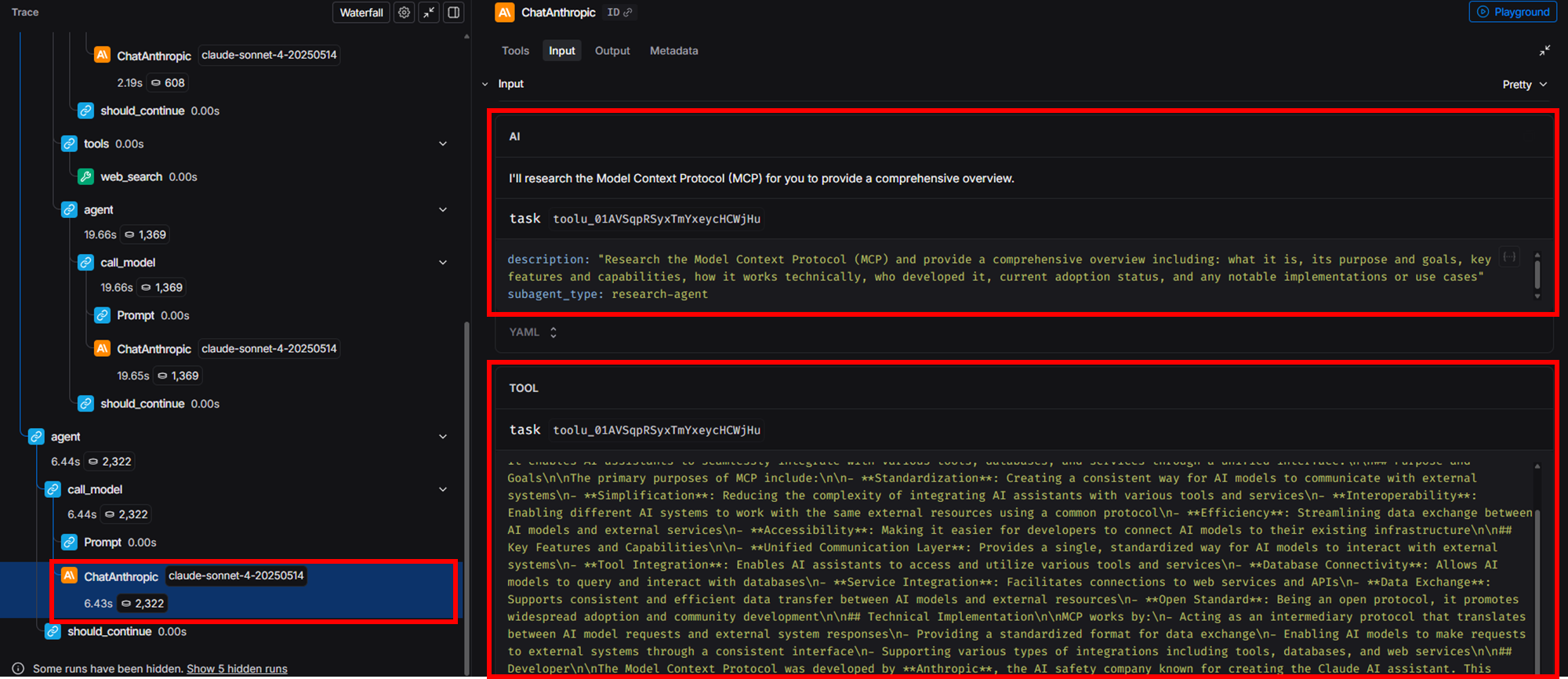
이제 우리가 Model Context Protocol에 대한 overview를 제공해달라며 model을 invoke한다.

이후 Main AI Message가 있고, 여기서 Description과 함께 Task Tool을 호출하고,
Sub Agent는 research-agent라고 말하고 있다.
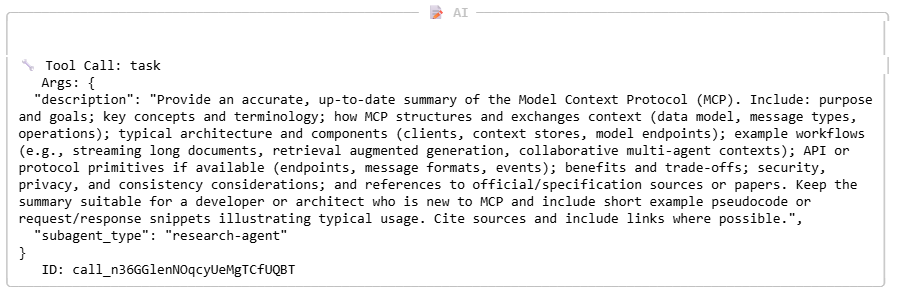
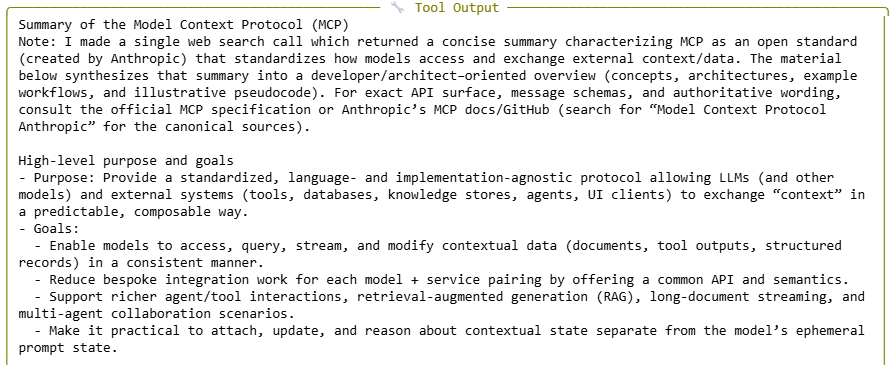
그 다음으로 Tool output을 볼 수 있다.
Tool이라고는 하지만 Main Agent가 Sub Agent를 Tool로서 호출을 한 것이고, 이것이 Sub Agent의 출력이다.
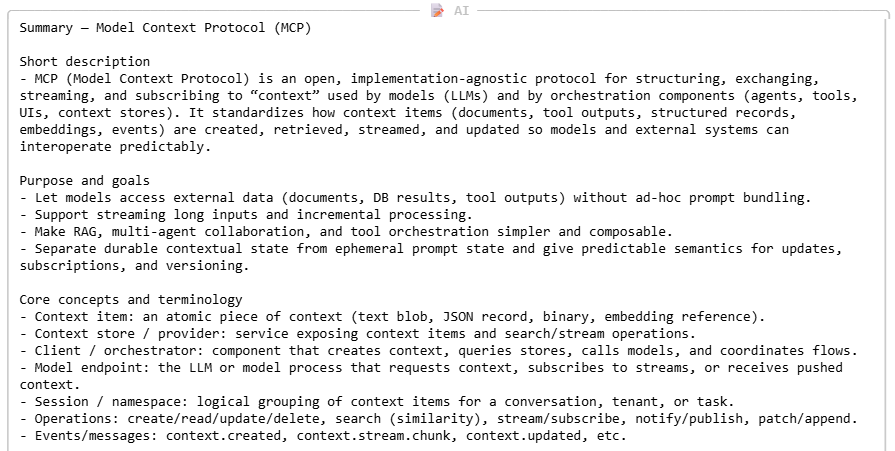
그 다음에 여기서 Main Agent의 응답이 나온다.
Main Agent는 Sub Agent의 출력 결과를 받아서 사용자에게 최종 응답을 전달한다.
2) Trace 확인하기
우선, Main Agent의 Model이 task라는 도구를 호출한다.
이 과정에서 어떤 Sub Agent에게 작업을 위임할지를 결정한다.
Main Agent는 오직 Task Tool의 목록에만 접근할 수 있다.

이후 Task를 Delegation 받은 Sub Agent(web-search)의 또 다른 Model이 작업을 수행한다.
SYSTEM PROMPT를 보면 Main Agent보다 훨씬 단순하다는 것을 볼 수 있다. (하 Task에 집중한다)
web-search Tool을 호출하여 결과를 반환받는다. (여기서 Mock Result를 반환받는다)

도구 호출 결과를 바탕으로 Sub Agent의 Model이 최종 출력을 전달한다.
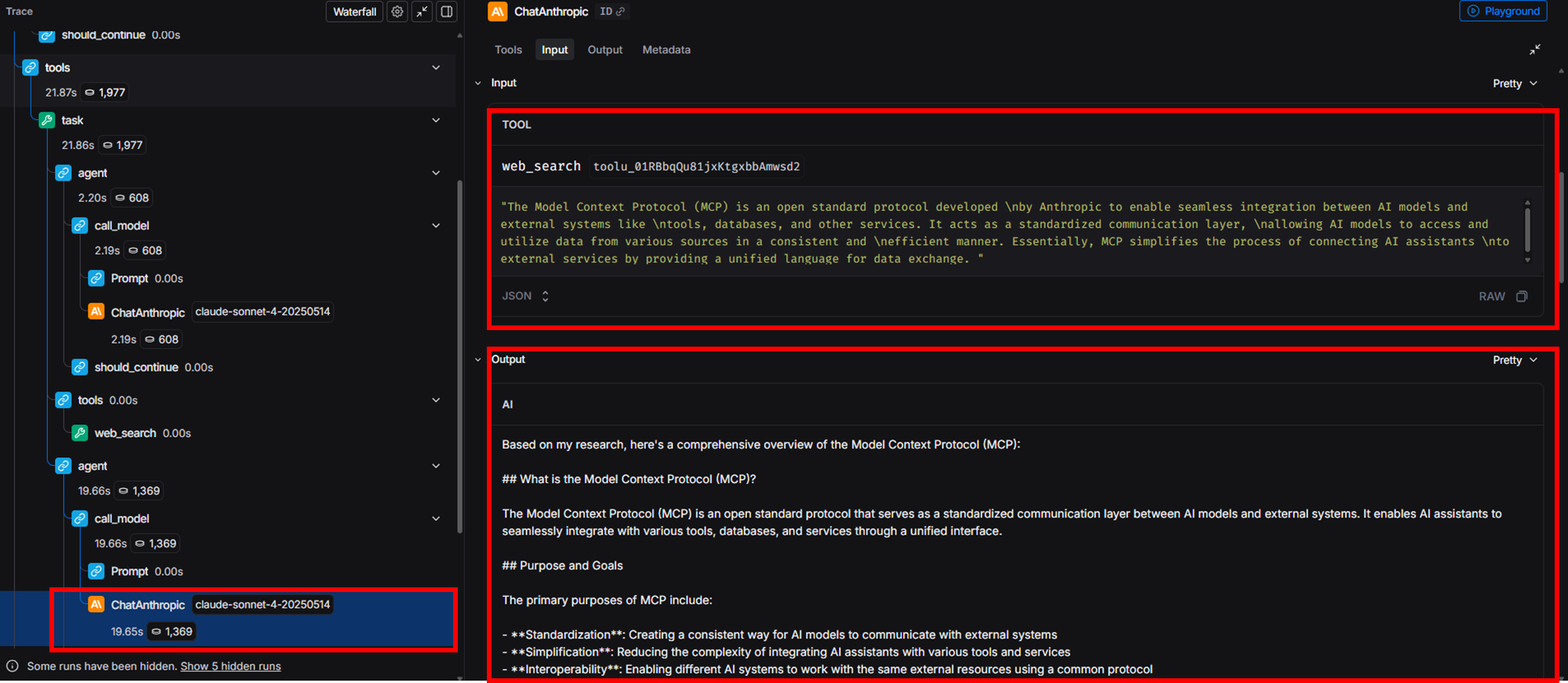
이후 Main Agent가 Tool 호출 결과(여기서의 Tool은 Sub Agent(web-search가 됨)를 바탕으로 최종 응답을 생성한다.
'Agentic AI 구축 > LangChain & LangGraph' 카테고리의 다른 글
| Ambient Agent의 개념 (이벤트 기반 Persistent AI Agent 아키텍처) (0) | 2026.03.14 |
|---|---|
| [Deep Agent 구현 2] File 시스템 구축하기 (0) | 2026.02.23 |
| [Deep Agent 구현 1] Todo list 구현하기 (0) | 2026.02.23 |
| [LangChain 함수 8] Human-in-the-Loop 구현하기 (Middleware) (0) | 2026.02.04 |
| [LangChain 함수 7] Agent Customizing하기 (Middleware를 활용한 Dynamic Prompt) (0) | 2026.02.04 |