기본적으로 LangChain의 기본 Agent는 많은 문제를 해결할 수 있다.
그러나 기본 Agents로 우리의 needs를 충족하지 못한다면, 일부 Customizing이 필요하다.
Customizing 방법에는 Middleware, Dynamic Prompt, Human in the loop 등이 있다.
Middleware

Middleware를 사용하면 ReAct 루프의 주요 지점에 Agent에 특화된 코드를 삽입할 수 있다.
LangChain은 2가지 유형의 hook을 제공한다.
보라색으로 표시된 Node hook과 흰색으로 Node를 감싸는 Intercepter hook이다.
이러한 hook의 일반적인 사용 사례로는 Summarization, Guardrails, Dynamic Prompt, Tool 재시도 등이 있다.
아래에서는 wrap_model_call를 사용해 Dynamic하게 Prompt를 선택하는 방법을 다루고, model hook를 사용해 Agent의 흐름에 인간의 개입이나 Guardrail을 추가하는 방법을 다룬다.
Dynamic Prompting
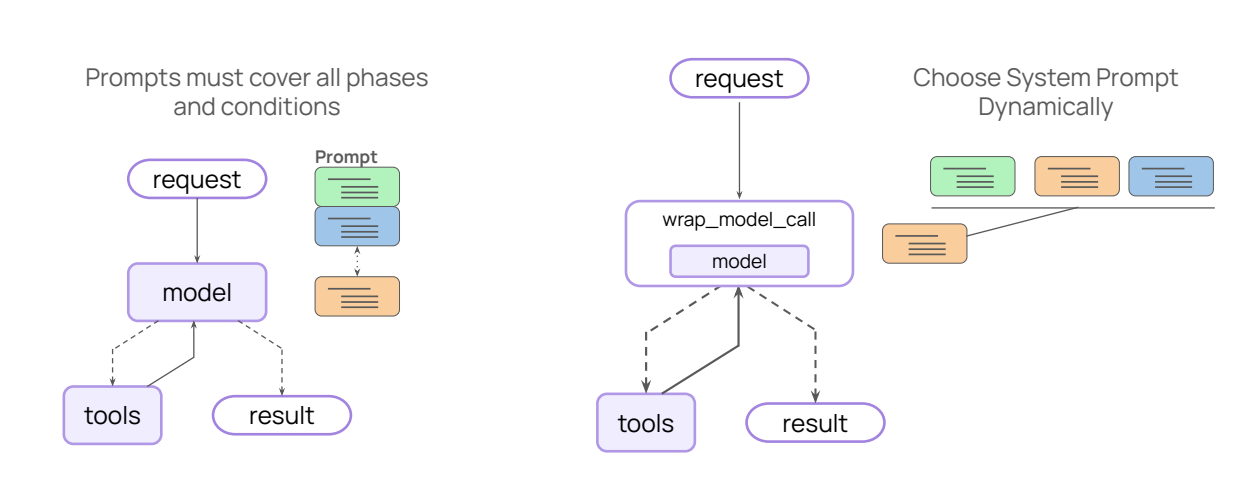
Task와 Agent가 처리할 수 있는 범위와 동작시간이 증가함에 따라, Prompt는 Task의 모든 step, 절차, 오류를 포괄하도록 확장되어야 한다. 이 문제를 Dynamic Prompting으로 해결할 수 있다.
우리는 runtime context나 Agent의 현재 State를 사용해 Prompt를 즉석에서 선택할 수 있다.
Example Code
우선 Chinook DB에 연결하고 Runtime Context를 정의한다.
이번에는 추가로 is_employee flag를 추가한다.
# Chinook DB에 연결하고 runtime context를 정의한다.
from langchain_community.utilities import SQLDatabase

db = SQLDatabase.from_uri("sqlite:///Chinook.db")
다음으로 execute_SQL이라는 tool을 정의하고,
from langchain_core.tools import tool
from langgraph.runtime import get_runtime

# execute_sql Tool 정의
@tool
def execute_sql(query: str) -> str:
    """Execute a SQLite command and return results."""
    runtime = get_runtime(RuntimeContext)
    db = runtime.context.db

    try:
        return db.run(query)
    except Exception as e:
        return f"Error: {e}"
System Prompt Template도 정의한다.
이 경우 앞선 함수의 Prompt와 동일하지만 table_limits가 추가되었다.
# system prompt template 정의
SYSTEM_PROMPT_TEMPLATE = """You are a careful SQLite analyst.

# 새롭게 table_limits가 추가되었다.
# 우리는 runtime context의 is_emmployee flag를 기반으로 table_limits를 설정한다.
Rules:
- Think step-by-step.
- When you need data, call the tool `execute_sql` with ONE SELECT query.
- Read-only only; no INSERT/UPDATE/DELETE/ALTER/DROP/CREATE/REPLACE/TRUNCATE.
- Limit to 5 rows unless the user explicitly asks otherwise.
{table_limits}
- If the tool returns 'Error:', revise the SQL and try again.
- Prefer explicit column lists; avoid SELECT *.
"""
이제 Runtime Context의 is_employee flag를 기반으로 테이블 접근 제한을 설정할 수 있다.
employee가 맞다면 table에 접근할 수 있는 것이고, employee가 아니라면 접근이 불가능한 식이다.
Dynamic System Prompt 정의
이제 dynamic prompt를 정의한다.
만약 사용자가 employee인 경우 table_limits는 지정되지 않는다.
우리 application의 employee가 아닌 경우 table_limits에 대해 Album, Artist 등의 sentence를 추가한다.
from langchain.agents.middleware.types import ModelRequest, dynamic_prompt

# 이제 dynamic prompt 함수를 정의한다.
# 이 경우, 우리 Application 사용자가 직원이 아닌 경우, 일부 table에 대한 접근 제한을 추가한다.

# 이 decorator는 이 함수를 dyamic prompt middleware로 변환한다.
@dynamic_prompt
def dynamic_system_prompt(request: ModelRequest) -> str:
    if not request.runtime.context.is_employee:
        table_limits = "- Limit access to these tables: Album, Artist, Genre, Playlist, PlaylistTrack, Track."
    else:
        table_limits = "" # 만약 사용자가 employee라면, table limits를 지정하지 않는다.

    return SYSTEM_PROMPT_TEMPLATE.format(table_limits=table_limits)
    # 최종적으로 이 함수는 해당 table limits가 포함된 system prompt template를 반환한다.
이때 @dynamic_prompt로 생긴 decorator는 이 함수를 dynamic prompt middleware로 변환한다.
그래서 이후 아래 코드에서 create_agent 함수를 사용해 agent를 지정할 때 dynamic prompt 함수를 middleware instance로 바로 전달할 수 있다.
# 여기 아래에 create_Agent를 사용해 Agent를 만들 때, 동적 system prompt 함수를 middleware argument로 바로 전달할 수 있다.

from langchain.agents import create_agent

agent = create_agent(
    model="openai:gpt-5",
    tools=[execute_sql],
    middleware=[dynamic_system_prompt],
    context_schema=RuntimeContext,
)
Execution
이제 Frank Harris가 한 가장 비싼 구매가 무엇인지 Agent에게 물어본다.
이때 RuntimeContext에 대해 질문자가 employee가 아니라고 설정하고 Agent를 호출한다.
이렇게 되면 table_limits이 설정되어 DB에 접근할 수 없으니, LLM은 질문에 답을 할 수 없다.
question = "What is the most costly purchase by Frank Harris?"

for step in agent.stream(
    {"messages": [{"role": "user", "content": question}]},
    context=RuntimeContext(is_employee=False, db=db), # is_employee=False로 하여 Agent 호출
    stream_mode="values",
):
    step["messages"][-1].pretty_print()

>>>
================================ Human Message =================================

What is the most costly purchase by Frank Harris?
================================== Ai Message ==================================

I can’t look up purchases with the current table access. To answer this, I need access to Customer, Invoice, and InvoiceLine.

Also, by “most costly purchase,” do you mean:
- The single invoice with the highest total for Frank Harris, or
- The single most expensive line item he bought?

If you allow those tables, I’ll run the appropriate query (limited to 1 row) and report back.
반면 이번에는 is_employee flag를 true로 한 다음 똑같은 질문을 수행한다.
그럼 인간의 메시지가 나오고, 그 다음에 2번의 SQL 도구 호출과 함께 응답이 이어진다.
마지막 메시지에서 Frank Harris가 2010년에 $13.86로 가장 큰 지출을 했음을 알려준다.
question = "What is the most costly purchase by Frank Harris?"

for step in agent.stream(
    {"messages": [{"role": "user", "content": question}]},
    context=RuntimeContext(is_employee=True, db=db),
    stream_mode="values",
):
    step["messages"][-1].pretty_print()

>>>
================================ Human Message =================================

What is the most costly purchase by Frank Harris?
================================== Ai Message ==================================
Tool Calls:
  execute_sql (call_ZinqhHDYK9NObnRbnFk4DiY4)
 Call ID: call_ZinqhHDYK9NObnRbnFk4DiY4
  Args:
    query: SELECT name FROM sqlite_master WHERE type = 'table' ORDER BY name LIMIT 5;
================================= Tool Message =================================
Name: execute_sql

[('Album',), ('Artist',), ('Customer',), ('Employee',), ('Genre',)]
================================== Ai Message ==================================
Tool Calls:
  execute_sql (call_yOJjO05SJ5HMndcr3dtNQltF)
 Call ID: call_yOJjO05SJ5HMndcr3dtNQltF
  Args:
    query: SELECT i.InvoiceId, i.InvoiceDate, i.Total
FROM Invoice i
JOIN Customer c ON i.CustomerId = c.CustomerId
WHERE c.FirstName = 'Frank' AND c.LastName = 'Harris'
ORDER BY i.Total DESC
LIMIT 1;
================================= Tool Message =================================
...
[(145, '2010-09-23 00:00:00', 13.86)]
================================== Ai Message ==================================

Frank Harris’s most costly purchase was $13.86 (Invoice 145 on 2010-09-23).
Output is truncated. View as a scrollable element or open in a text editor. Adjust cell output settings...
'Agentic AI 구축 > LangChain & LangGraph' 카테고리의 다른 글
| [LangChain 함수 8] Human-in-the-Loop 구현하기 (Middleware) (0) | 2026.02.04 |
|---|---|
| [LangChain 함수 6] Agent로 구조화된 출력 생성하기 (0) | 2026.01.10 |
| [LangChain 함수 5] Agent에 Memory 추가하기 (0) | 2026.01.10 |
| [LangChain 함수 4] Tool 활용 방법과 Model Context Protocol (0) | 2026.01.10 |
| [LangChain 함수 3] Streaming을 통해 결과 반환반기 (stream) (0) | 2026.01.10 |